Wednesday, September 29, 2021

Microservices

WHAT ARE MICROSERVICES:

A buzz world these days called Microservices are small, autonomous services that work together. Microservices are working on a principle which is called Single Responsibility Principle. 

Single Responsibility Principle

According to Rober C. Martin - "Gather together those things that change for the same reason, and separate those things that change for different reasons


Lets go back when Microservices architecture evolved. 

Many successful companies, such as Netflix, Spotify, Twitter, Amazon, or Linkedin started their business based on a monolith. This approach is known as Monolith first. Monolith is user base is small but as the system grows it starts becoming a pain in various ways. However,  all legacy applications to date were written as Monoliths first and were well written, tested code, regularly maintained and used over years effectively. 

Later, as these companies grew, began to offer more services, and focused on rapid development, they switched to a microservice architecture that better served these tasks.

Here is an example of a system which is created as a monolith. If you see, all the components are all together dependent on each other and forms a big block of software called Monolith architecture of a typical online retain application. 


 Business domain

All components are tightly coupled and dependent on each other. 


(Monolithic architecture)


Good stuff about Monolith (Advantages):


Bad stuff about Monoliths:


Evolution of SOA:


Good stuff about SOA


Bad stuff about SOA:


Evolution of Enterprise Service Bus (ESB):


Good stuff about ESB:


Problems with ESB:


Characteristics of Microservices:

Small, and Focused on Doing One Thing Well


 Benefits of Microservices:

  • Scalability
  • Availability
  • Resiliency
  • Flexibility
  • Autonomous: Develop, Deploy, and Scale Independently
  • Decentralized governance
  • Failure isolation
  • Auto-Provisioning
  • Continuous delivery through DevOps


Sunday, August 15, 2021

React Native

Prequisites:

1.  npm install react-native

2. Download and Install Android Studio

3. Install  Java (https://www.oracle.com/technetwork/java/javase/downloads/jdk8-downloads-2133151.html)

4. Install Node

5. Install Python


Why React Native:

React Native = React Framework + Javascript 

Alternatives of React Native : ionic and flutter


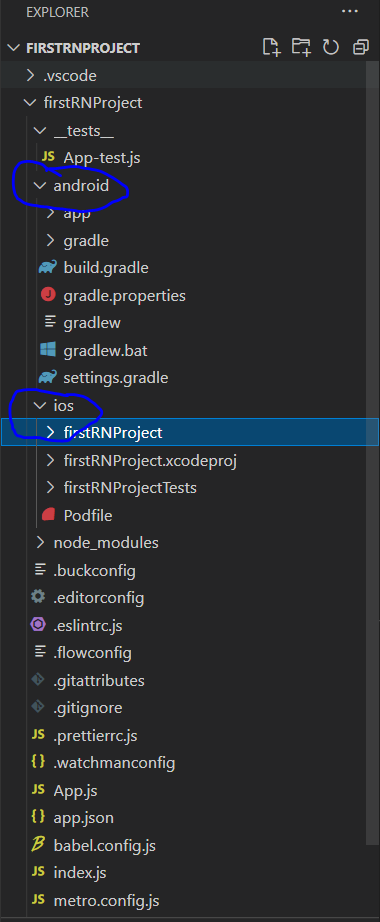
Setup React Native Project


npx react-native init <AppName>

Boilerplate generates for Android and Ios both.


Tuesday, May 25, 2021

NestJS - The Progressive NodeJS framework

 Refer the website : https://nestjs.com/

NestJS provides an out-of-the-box application architecture which allows developers and teams to create highly testable, scalable, loosely coupled, and easily maintainable applications. The architecture is heavily inspired by Angular.

Installation:

npm install -g @nestjs/cli
To create, build and run a new basic Nest project in development mode:

nest new casper-new-project

It creates a boilerplate

Running the application#

Once the installation process is complete, you can run the following command at your OS command prompt to start the application listening for inbound HTTP requests:


$ npm run start

This command starts the app with the HTTP server listening on the port defined in the src/main.ts file. Once the application is running, open your browser and navigate to http://localhost:3000/. You should see the Hello World! message.


Wednesday, May 8, 2019

RabbitMQ and MassTransit

Messaging systems:
In the real world, applications needs to talk to each other by sending messages.
Messaging has been around for decades.

Advanced Message Queuing Protocol (AMQP) is a protocol used by software companies to interact with the other applications. It is a neutral framework which makes the communication inter-operable. This was developed by different vendors like TIBCO, Microsoft MSMQ, IBM MQ Series.


Here is a list of different AMQP products:
AMQP Key concepts:
Message Broker:
Exchanges
Queues
Bindings

RabbitMQ:

RabbitMQ is a free and complete AMQP broker implementation. It implements version 0-9-1 of the AMQP specification; this is the most widespread version today and it is the last version that focuses on the client API.

It is built upon Erlang programming technologies. Erlang comes from the telecom background and gained a good reputation in the real world for its supper efficiency and reliability.

Time to install RabbitMQ. Not going to covert this at the moment due to time constraint.
After installation, just access the administration using the URL - http://localhost:15672/ and provide the username and password as “guest”.
To connect your .NET application to RabbitMQ using AMQP is done through using .NET api library or WCF service.
RabbitMQ.Client.dll is the .NET API DLL which you need to use to connect to RabbitMQ.
Next step towards using RabbitMQ is to create an exchange and queue. This can be done either manually using RabbitMQ web interface or through dynamically by coding either using C# or Powershell.


What is MassTransit?

MassTransit is a free, open-source distributed application framework for .NET. MassTransit makes it easy to create applications and services that leverage message-based, loosely-coupled asynchronous communication for higher availability, reliability, and scalability.

Tuesday, April 2, 2019

Modern JS (ES6], ES7...) features - TIPS and TRICKS


The Spread operator (feature of ES6)
The Spread operator is three dot (...) operator that perform different types of operations and after learning it you can say “I could do it with my eyes shut”.

So here are the examples :

1. Combine the content of the array :
If we have two arrays and we want a third array that combine the two arrays into one:

var devTeams = ["Yukon", "Thor", "Bradford", "Bristol"]
var qaTeams = ["Ward", "Blackwood"]
var teams= [...devTeams, ...qaTeams]

console.log(teams)   //  [ "Yukon", "Thor", "Bradford", "Bristol", "Ward", "Blackwood" ]

Here all the items of devTeams and qaTeams are pushed to one array called teams. You can also achieve this using concate().

var devTeams = ["Yukon", "Thor", "Bradford", "Bristol"]
var qaTeams = ["Ward", "Blackwood"]
var teams= devTeams.concat(qaTeams);

console.log(teams)   //  [ "Yukon", "Thor", "Bradford", "Bristol", "Ward", "Blackwood" ]

Note: Concatenation using the spread operator is three times slower than using concat. So, it better to use concat() for large data set.


2. Copy array :
As we know, slice() is javascript array method that allows us to copy the array.
For example :

// old
var devTeams = ["Yukon", "Thor", "Bradford", "Bristol"]
var cloneDevTeams = devTeams.slice();
console.log(cloneDevTeams );   //  [ "Yukon", "Thor", "Bradford", "Bristol"]

// new
var devTeams = ["Yukon", "Thor", "Bradford", "Bristol"]
var cloneDevTeams = [...devTeams];
console.log(cloneDevTeams );   //  [ "Yukon", "Thor", "Bradford", "Bristol"]

In both examples devTeams  and cloneDevTeams pointing to the different memory.


3.Grab the last item from the array

var devTeams = ["Yukon", "Thor", "Bradford", "Bristol"]
var [last] = devTeams .reverse()
console.log(last)   // Bristol
console.log(devTeams.join(', '))   // Bristol, Bradford, Thor, Yukon

So here what happened? Can you try to find the problem?
Actually the reverse function has been altered or mutated the array. In a world of the spread operator, we don’t have to mutate the original array. First, we can create a copy of the array and then reverse it:

var devTeams = ["Yukon", "Thor", "Bradford", "Bristol"]
var [last] = [...devTeams ].reverse()
console.log(last)   // Bristol
console.log(devTeams.join(', '))   // Yukon, Thor, Bradford,  Bristol

4. Get some, or the rest, of the items in the array

var devTeams = ["Yukon", "Thor", "Bradford", "Bristol"]
var [first, ...rest] = devTeams;
console.log(rest.join(", "))   // Thor, Bradford,  Bristol
console.log(first);    //Yukon

Note: Here first and rest are not keywords as mentioned below
var [first, ...rest] = devTeams;
Or
var [start, ...remaining] = devTeams;


5. Insert array into the middle of the array but not an array within array

var middleArr = [0, 0];
var arr = [8, 7, middleArr, 6, 5];

From the above mentioned code, Can you guess the answer of arr?

The answer is :  [8, 7, [0, 0], 6, 5]

It’s good if you want the same result but what if I want a single array, not like as mentioned above.

So, here we can use the Spread operator as its allow us to expand the array too.
var middleArr = [0, 0];
var arr = [8, 7,...middleArr, 6, 5];

console.log(arr);
// [8, 7, 0, 0, 6, 5]

It is like magic…….. And also you can say It’s easy as pie… :)


6. Math

We can also use math functions with the Spread operator and here I will be using Math.max() for explanation.

Math.max();
// -Infinity
Math.max(1, 2, 3);
// 3
Math.max(100, 3, 4);
// 100

Without the spread operator, easy way to use Math.max() with apply

var arr = [2, 4, 8, 6, 0];
function max(arr) {
 return Math.max.apply(null, arr);
}
console.log(max(arr));
// Output: 8

So, What you think, what is the syntax of finding the max value with the Spread operator?

Here is the code:
var arr = [2, 4, 8, 6, 0];
var max = Math.max(...arr);
console.log(max);


7. String to Array
Could you imagine, how many lines of code you will write to achieve the goal as mentioned?
Use the spread operator to simply convert a string to an array of characters:

var str = "helloworld";
var chars = [...str];
console.log(chars);
// [ "h", "e", "l", "l", "o", "w", "o", "r", "l", "d" ]


8. Replace apply:
In cases where you want to use the elements of an array as arguments to a function.

Example with apply
function myFunction(x, y, z) { console.log('Value y is ' + y); }
var args = [0, 1, 2];
myFunction.apply(null, args);
Example with Spread operator
function myFunction(x, y, z) { console.log('
// Value of y is 1

Value y is ' + y); }
var args = [0, 1, 2];
myFunction(...args);

// Value of y is 1

9. Shallow-cloning
Shallow-cloning (excluding prototype) or merging of objects is now possible using a shorter syntax than Object.assign().


var obj1 = { foo: 'bar', x: 42 };
var obj2 = { foo: 'baz', y: 13 };

var clonedObj = { ...obj1 };
// Object { foo: "bar", x: 42 }

var mergedObj = { ...obj1, ...obj2 };
// Object { foo: "baz", x: 42, y: 13 }


Sunday, March 10, 2019

Powershell - Renaming multiple files/folders at once

Get-ChildItem -Path C:\projects *document-manager-* -Directory | ForEach-Object -Process {Rename-item -Path $_.Name -NewName ($_.name -replace "document-manager-","") -whatif}


Get-ChildItem -Path C:\projects *document-manager-* -Directory | ForEach-Object -Process {Rename-item -Path $_.Name -NewName ($_.name -replace "document-manager-","") -Verbose}

Friday, March 1, 2019

Powershell - Basics

Powershell is a command line interface

Based on .NET and everything in a .NET object

introduced in 2003 under code name Monad.

Version 1  release in 2006 as optional add-on

Veresion 2 was included in Windows 7 and windows server 2008 R2, XP SP3, Vista SP1.

Commands in PS are called Command-lets
Command-lets have verb-noun syntax like Get-Help, Get-Command, Set-Location... etc

Basic commands:

1. Get-Command
2. Get-Command -verb "get"
3. Get-Command -noun "service"
4. Get-Help Get-Command
5. Get-Command -?
6. Set-Location


Pipelining : in powershell, combining the commands is called pipelining
Ex:
Get-ChildItem | Where-Object { $_.Length -gt 10000kb }

This command finds all files which has length greater than 10000KB in size.

Extending the example :

Get-ChildItem | Where-Object { $_.Length -gt 100000kb }
Sort-Object Length
Select-Object Name, Length
Format-Table -Property Name, Length -Autosize


Clear-Host : Clears the screen


Variables in PS:

 All variables start with $

$myvariable = "Hello Variable"
$myvariable

This prints "Hello Variable" on console window. Everything is a .NET object including variables.
This is a string type variable and in next line we are printing the variable value.

Type can be see by $myvariable.GetType()

So all methods which are associated with string data type in .NET are applicable. For example :
$myvariable.ToUpper() returns HELLO VARIABLE.


Similarily, integer operations can be carried out on integer variables. For example

$age = 32
$age -gt 30

This returns True as 32 is greater than 30. Just demoing here that integer operation has been used here
Conversions:

"42" -eq 42

What will it show?
It will be True. Because string 42 is compared with numeric 42 and hence integer 42 is first converted to string and then compared. 
Rule is that the right side operand is converted to datatype of left side operand.


Alternate syntax of declaring a variable:
New-Variable -Name var -Value 123

equivalent to :
$var = 123


same way
Get-Variable var is equivalent to $var

Other variable related commands:
Set-Variable -Name var -Value 900
Clear-Variable -Name var
Remove-Variable -Name var
Get-Variable
Get-Variable var


Escape sequence:
Backtick N:  `n
Backtick B: `b
Backtick t: `t

@ sign:

$var = @'
Some text here

   a bit more

 a blank line above
'@

Using expressions in string

"There are $((Get-ChildItem).Count) items"

"The 15% tip of 33.33 dollar bill is $(33.33*0.15) amount"

[string]::Format("There are {0} items. " , $((Get-ChildItem).Count) )

PS shortcut for this is:

"There are {0} items" -f $((Get-ChildItem).Count)

Wildcards:

"Mysite" -like "My*"   # Returns True  (asterick)
"Mysite" -like "?ysite" # Returns True (single character)
"Mysite" -like "My*[e-t]" # Return True as matching last character in the range of characters ( range check)

Regex:
"888-368-1240" -match "[0-9]{3}-[0-9]{3}-[0-9]{3}"


Arrays:
$array = "Robert", "Cain"
$array

$array = @("Robert", "Cain") 

Creating an empty array:
$array = @()
$array.Count

$array = 1..5 
$array # prints values 1 to 5

$array -contains 42 # checks whether array contains value 42

$array -notcontains 42

Hashtables

$hash = @{ "Key" = "Value"; "Site" = "mysite.com"; "user" = "vikas" }
$hash
$hash["Site"] # prints mysite.com

$mykey = "user"
$hash.$mykey #prints vikas 

$hash["newkey"] ="newvalue"  # a new key is added


$hash.remove("newkey")
$hash.Contains("Site") 
$hash.CintainsValue("vikas") # Prints True by finding value vikas

$hash.Keys  #Prints all keys
$hash.Values #Prints all values

Automatic Variables:
PS has some auto defined variables:

1. $pwd : current directory
2. $host : info about user machine
3. $PID : process id
4. $PSVersionTable : versions for PS
5. $_ : Current object
6. $Home : user's home directory
7. $NULL
8. $true and $false


Branching :

1. if else 

if($var -eq 1)
{
    "if condition"
}
else 
{
    "else condition"
}

Nesting:


if($var -eq 1)
{
    "if condition 1"
}
else 
{
  if($var -eq 2)
  {
    "if condition 2"
  }
  else 
  {
    "else condition 2"
   }
    "else condition 1"
}


Switch statement:

switch($var)
{
   41 { "forty one" ; break}
  42 { "forty two" break}
  default { "default" }
}

switch(3,1,2,42)
{
   1 {"one"}
   2 { "two"}
   3 {"three" }
  default {"default"}
}

By default switch is case insensitive. To make it case sensitive , we need to write
switch -casesensitive ("mysite")

Switch also supports wildcards:

switch -wildcard ("mysite")
{
    "mysi*": {"matched"}
}


Looping:

While Loop:

$i = 1
while ($i -le 5)
{
    "`$i = $i"
     
}


Do while Loop:
$i = 1
do
{
   "`$i = $i"
   $i++
} while ($i -le 5)


Do Until Loop

$i = 1
do
{
   "`$i = $i"
   $i++
} until($i -gt 5)

For loop:
for($i = 0; $i -lt 5; $i++)
{
    $i
}


For-Each Loop:

$array = 11, 12, 13, 14, 15

foreach($item in $array)
{
    $item
}

break and continue can be used in Foreach loop


using Labels:


Script Blocks

$cool = { Clear-Host; " I am cool block" }
& $cool


Sending parameters to scriptblocks:

two ways 
# Using parameters:
$qa = {
     $question = $args[0]
    $answer = $args[1]

    write-host " Question is $question and answer is $answer"
}

&$qa "my question" "my answer"


#Using param command  (recommended as it is cleaner approach) : 

$qa = {
   param ($question,  $answer)
    write-host " Question is $question and answer is $answer"
}

&$qa  -question "my question"  -answer "my answer"
&$qa  -q"my question"  -a "my answer"  # shortcuts for param names
&$qa  "my question"  "my answer"

if you don't pass the param :

$qa = {
   param ($question,  $answer = "default empty answer ")   # default value if answer param is not passed.
    write-host " Question is $question and answer is $answer"
}

&$qa  -question "my question"  


Error handling :
New keyword Trap is just like catch block in C#

function Get-Div($n1, $n2)
{
     return $n1 / $n2
   trap
   {
      "error occurred"
      write-host $_.Exception
   }
   
}

Clear-Host
Get-Div 10 0


Get-Content: is used to get the contents of a file.
For ex:

$a = Get-Content "C:\\a.txt"

Set-Content: used to set the contents in a file.

Export-Csv used to convert collection into a CSV file. 

Import-Csv: used to get the contents of csv and set into a collection.


Out-File: to send output to a file.


Import-Module

Import-Module "C:\intro\MainFunctions.ps1"


Comments:

Single line comments : #
Multi line comments:  <# #>


Opening a File :

Invoke-Item

Invoke-Item "C:\a.txt"