Monday, August 8, 2022

Client side error catching using Sentry.io

 When going live with an application we very often come up with the question how reliable it really works on the clients machines. The most important thing for the operators of the application is to monitor crashes and errors caused by the application.

We can catch Server side errors easily with Logging and monitoring tools available these day but how about any issue rising in Client side due to client side scripting i.e JS or due to browser's incompatibility. 

All these issues are to be caught up to analyze and hence comes Sentry. 

In the past, I have used Raygun.io for the same purpose but Sentry is more robust and popular. 

“Every developer writes tons of bugs. And many of those bugs get shipped to production. That’s unavoidable. But thanks to Sentry, you can find and fix those bugs before your customers even notice a problem. When things go to hell, we’ll help you fight the fires.” 

-- Sentry’s website.

I am working on an angular application on Front end side and here is the code to install Sentry package :

npm install --save @sentry/angular @sentry/tracing

Use the following plumbing code in the main.ts file to initialize Sentry:

Sentry.init({
  dsn: "https://...." ,
  environment: environment.production ? 'prod' : 'dev',
  integrations: [
    // Registers and configures the Tracing integration,
    // which automatically instruments your application to monitor its
    // performance, including custom Angular routing instrumentation
    new Integrations.BrowserTracing({
      tracingOrigins: ["localhost", "https://yourserver.io/api"],
      routingInstrumentation: Sentry.routingInstrumentation,

    }),
  ],

  // Set tracesSampleRate to 1.0 to capture 100%
  // of transactions for performance monitoring.
  // We recommend adjusting this value in production
  tracesSampleRate: 1.0,
}
Relevant readings:
Angular + Sentry: Application Monitoring with Releases & Source Maps | by Leonardo Giroto | Loft | Medium

Saturday, August 6, 2022

Angular Documentation

 When I tried to read about the an already written Angular app, I felt difficult to know all components, services, directives. 

The idea of generating a documentation for angular app came in mind and voila, there are already some products which generate Angular app documentation for a product. The product I used is called compodoc. 

To install compodoc, simply run

 npm install --save-dev @compodoc/compodoc

Then update your package.json

"scripts": {
    "compodoc": "compodoc -p tsconfig.json"
}

Then you can run compodoc as a normal npm script using

npm run compodoc

Monday, July 25, 2022

Redis - Caching in .NET using C#

Performance optimization drives us to implement a caching mechanism in our system. One of the best way is to use Caching to store frequent data.

Caching is the way of storing data in a temporary storage location, so that data retrieval can be made more efficient.


Usually, we put that kind of data in cache that changes infrequently. 

For example, to get a person’s Avatar you might need a trip to the database. Instead of performing that trip every time, we will save that Avatar in the cache, pulling it from memory every time you need it.

Benefits of Caching:

1. Reduces the load on server by reducing the round trips to the server

2. Increases performance by making application more responsive. 

Types of Cache:

  • In-Memory Cache is used for when you want to implement cache in a single process. When the process dies, the cache dies with it. If you’re running the same process on several servers, you will have a separate cache for each server.

  • Persistent in-process Cache is when you back up your cache outside of process memory. It might be in a file, or in a database. This is more difficult, but if your process is restarted, the cache is not lost. Best used when getting the cached item is expansive, and your process tends to restart a lot.

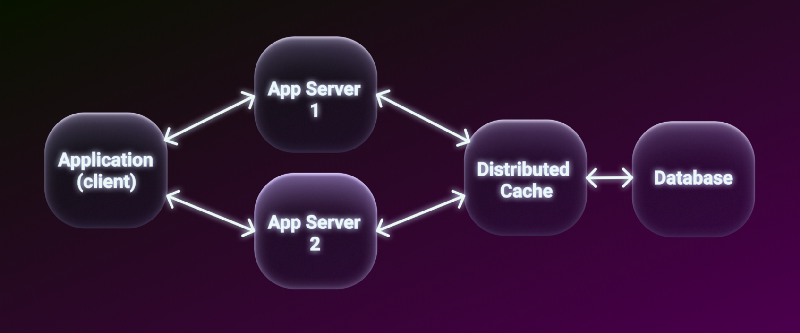
  • Distributed Cache is when you want to have shared cache for several machines. Usually, it will be several servers. With a distributed cache, it is stored in an external service. This means if one server saved a cache item, other servers can use it as well. Services like Redis are great for this.
To make distributed caches easy to use and keep them fast, they typically employ a “NoSQL” key/value access model and store values as serialized objects

Tools for Distributed Cache :
1. MemCached
2. NCache
3. 


Distributed cache with Redis:
A distributed cache is a cache shared by multiple app servers, typically maintained as an external service to the app servers that access it. A distributed cache can improve the performance and scalability of an ASP.NET Core app, especially when the app is hosted by a cloud service or a server farm.


The use of Redis is widespread in distributed caching scenarios. Redis is an in-fast-memory datastore, it is opensource and is of key-value type. 

It provides response times of less than one millisecond, allowing millions of requests per second for each real-time application in a variety of fields.
If the infrastructure of your application is based on an AWS cloud, the service Elastic Cache -> Redis Cache is available, and it can be configured from your subscription.

To use the distributed cache on Redis, the installation of the package Microsoft.Extensions.Caching.Redis is necessary.

Package: Microsoft.Extensions.Caching.StackExchangeRedis

Code Links:


Monday, April 4, 2022

Getting credentials from AWS

 There are various ways to get the credentials from AWS:

I have been using AWS SDK.NET and here is the code to get credentials using IAM role. To run this code, make sure you are running this application on EC2 instance. 


     private async Task<Stream> GetS3BucketFileIAM(string filepath)

        {

            var credentials = FetchCredentials();


            var request = new GetObjectRequest

            {

                BucketName = _bucketName,

                Key = filepath

            };


            var config = new AmazonS3Config

            {

                RegionEndpoint = RegionEndpoint.GetBySystemName(_regionName)

            };


            var s3Client = new AmazonS3Client(credentials.AccessKey, credentials.SecretKey, credentials.Token, config);


            var response = await s3Client.GetObjectAsync(request);


            return response.ResponseStream;

        }


        private ImmutableCredentials FetchCredentials()

        {

            var securityCredentials = EC2InstanceMetadata.IAMSecurityCredentials;

            if (securityCredentials == null)

                throw new AmazonServiceException("Unable to get IAM security credentials from EC2 Instance Metadata Service.");


            string firstRole = null;

            foreach (var role in securityCredentials.Keys)

            {

                firstRole = role;

                break;

            }


            if (string.IsNullOrEmpty(firstRole))

                throw new AmazonServiceException("Unable to get EC2 instance role from EC2 Instance Metadata Service.");


            var metadata = securityCredentials[firstRole];

            if (metadata == null)

                throw new AmazonServiceException("Unable to get credentials for role \"" + firstRole + "\" from EC2 Instance Metadata Service.");


            return new ImmutableCredentials(metadata.AccessKeyId, metadata.SecretAccessKey, metadata.Token);

        }

Other way to use credentials is from Profile if someone has already installed AWS CLI

        private static AWSCredentials GetDefaultAwsCredentialsFromProfile()

        {

            var credentialProfileStoreChain = new CredentialProfileStoreChain();

            if (credentialProfileStoreChain.TryGetAWSCredentials("default", out var defaultCredentials))

                return defaultCredentials;


            return null;

        }


Helpful threads:

c# - How to set credentials on AWS SDK on NET Core? - Stack Overflow

Credential Loading and the AWS SDK for .NET (Deep Dive) - Steve Gordon - Code with Steve (stevejgordon.co.uk)


How to get metadata.

HowTo: Get Amazon EC2 Instance Metadata - Dowd and Associates

Authenticating to AWS with Instance Metadata | by Yevgeniy Brikman | Gruntwork

AWS Access Keys - A Reference - Nick Jones (nojones.net)

Doing AWS STS the right way. - Short Term Security · Archer Imagine

Credential and profile resolution - AWS SDK for .NET (amazon.com)


Thursday, January 20, 2022

Clean Code architecture

 The Clean Architecture is the system architecture guideline proposed by Robert C. Martin (Uncle Bob) derived from many architectural guidelines like Hexagonal Architecture, Onion Architecture, etc... over the years.


Follow the video provided by Jason Taylor 

Clean Architecture with ASP.NET Core 3.0 • Jason Taylor • GOTO 2019 - YouTube

https://jasontaylor.dev/clean-architecture-getting-started

GitHub - jasontaylordev/CleanArchitecture: Clean Architecture Solution Template for .NET 6


Sunday, January 9, 2022

Terraform

 Terraform

In today's standup call, heard someone talking about Terraform. 


Thursday, December 30, 2021

CSV Helper


CsvHelper:

A .NET library for reading and writing CSV files. Extremely fast, flexible, and easy to use.


Github:
https://joshclose.github.io/CsvHelper/


Reading a csv file :

public class Foo { [Name("id")] public int Id { get; set; } [Name("name")] public string Name { get; set; } }

using (var reader = new StreamReader(@"c:\projects\data.csv")) using (var csv = new CsvReader(reader, config)) { var records = csv.GetRecords<Foo>(); }

Writing to CSV:

using (var writer = new StreamWriter("c:\projects\data.csv")
using (var csv = new CsvWriter(writer, CultureInfo.InvariantCulture)) { csv.WriteRecords(records); }


Utility method for refactoring code for getting all the records from CSV:

private IEnumerable<T> ReadStream<T, TMap>(string csvPath) where TMap: ClassMap { IEnumerable<T> records; using (var reader = new StreamReader(this.awsS3Service.GetS3BucketFile(csvPath))) { using (var csv = new CsvReader(reader, CultureInfo.InvariantCulture)) { csv.Configuration.Delimiter = "|"; csv.Configuration.RegisterClassMap<TMap>(); records = csv.GetRecords<T>().ToList(); } } return records; }


Call above method using :
this.ReadStream<BrandFile, BrandFileCSVMap>(s3FilePath)

public class BrandFile { public int BrandId { get; set; } public string BrandName { get; set; } public string BrandWebsite { get; set; } public string BrandLogoURL { get; set; } }

public sealed class BrandFileCSVMap: ClassMap<BrandFile> { public BrandFileCSVMap() { AutoMap(CultureInfo.InvariantCulture); } }