Saturday, November 6, 2021

Enter into Exotic Angular World - JS Frameworks got candid

Angular

Let’s get practical by creating a simple todo app first.

Installations:

Install Visual Studio Code as code editor

Install nodejs and NPM

Install Angular CLI

npm install -g @angular/cli

ng new todo-apps

Visual studio folder has the following contents now:

To run the app, call :

Ng serve –open

The --open (or just -o) option automatically opens your browser to http://localhost:4200/.


Reference taken from https://angular.io/guide/setup-local

Here is the goal what we want to achieve:

Create a new component todolist:

ng generate component todolist

Todolist component needs  a list of todo tasks. Hence lets create a model for the list:

Create a file “model.ts” in a folder modals inside App folder

export class Model

{

    user:string;

    items:any;

    constructor() {

    this.user = "Adam";

    this.items = [new TodoItem("Buy Flowers", false),new TodoItem("Get Shoes", false),

                new TodoItem("Collect Tickets", true),

                new TodoItem("Call Joe", false)]

     }

}


export class TodoItem

{

     action;

     done;

     constructor(action: string, done: boolean)

     {

        this.action = action;

        this.done = done;

     }

}


TODO List is comprised of a set a TODOItems.

So, each ToDoItem has two properties action and done (Boolean).

Now time to design Template (HTML side of it). Copy the following code into todolist.component.html

<h3 class="bg-primary p-a-1">{{getUserName()}}'s To Do List</h3>


<div class="m-t-1 m-b-1">

    <input class="form-control" #todoText />

    <button class="btn btn-primary m-t-1" (click)="addItem(todoText.value)">

    Add

    </button>

</div>


<table class="table table-striped table-bordered">

 <thead>

 <tr><th></th><th>Description</th><th>Done</th></tr>

 </thead>

 <tbody>

 <tr *ngFor="let item of getTodoItems(); let i = index">

 <td>{{ i + 1 }}</td>

 <td>{{ item.action }}</td>

 <td><input type="checkbox" [(ngModel)]="item.done" /></td>

 <td [ngSwitch]="item.done">

 <span *ngSwitchCase="true">Yes</span>

 <span *ngSwitchDefault>No</span>

 </td>

 </tr>

 </tbody>

</table>


Now, need to add the following code in TS file to support the class methods called in above HTML file.

import { Component, OnInit } from '@angular/core';

import { Model, TodoItem } from '../modals/model';


@Component({

  selector: 'app-todolist',

  templateUrl: './todolist.component.html',

  styleUrls: ['./todolist.component.scss']

})

export class TodolistComponent implements OnInit {


  model = new Model();


  constructor() { }


  ngOnInit(): void {

  }


  getTodoItems(){

    return this.model.items.filter(item => !item.done);

  }

  getUserName(){

    return this.model.user;

  }


  addItem(newItem:string) {

      this.model.items.push(new TodoItem(newItem, false));

  }


}


Friday, October 8, 2021

Book - Enterprise Integration Patterns - Designing, Building And Deploying Messaging Solutions

The book explains various patterns required for the creation of right Microservice. 


Difference between Synchronous and Asynchronous with real world example:

A telephone call is a synchronous form of communication. We can only communicate with the other party if the other party is available at the time we place the call. 

Voice mail on the other hand, allows asynchronous communication. With voice mail, when the receiver does not answer, the caller can leave him a message; later the receiver (at his convenience) can listen to the messages queued in his mailbox. 
Voice mail enables the caller to leave a message now so that the receiver can listen to it later, which is lot easier than trying to get the caller and the receiver on the phone at the same time. Voice mail bundles (at least part of) a phone call into a message and queues it for later consumption.

What is messaging?
Messaging is a technology that enables high-speed, asynchronous, program-to-program communication with reliable delivery.

What are messages?
Programs communicate by sending packets of data called messages to each other. 
The message itself is simply some sort of data structure—such as a string, a byte array, a record, or an object. 
It can be interpreted simply as data, as the description of a command to be invoked on the receiver, or as the description of an event that occurred in the sender. 
A message actually contains two parts, 
1. a header and 
2. a body

The header contains meta-information about the message—who sent it, where it’s going, etc.; this information is used by the messaging system and is mostly (but not always) ignored by the applications using the messages. 

The body contains the data being transmitted and is ignored by the messaging system. In conversation, when an application developer who is using messaging talks about a message, he’s usually referring to the data in the body of the message. 


Channels, also known as queues, are logical pathways that connect the programs and convey messages. A channel behaves like a collection or array of messages, but one that is magically shared across multiple computers and can be used concurrently by multiple applications. 

A sender or producer is a program that sends a message by writing the message to a channel. 

A receiver or consumer is a program that receives a message by reading (and deleting) it from a channel.

What is a messaging System 
Messaging capabilities are typically provided by a separate software system called a messaging system or message-oriented middleware (MOM). 

A messaging system manages messaging the way a database system manages data persistence. 

An administrator configures the messaging system with the channels that define the paths of communication between the applications same like DBA creates a database schema. 

The messaging system then coordinates and manages the sending and receiving of messages. 

The reason a messaging system is needed to move messages from one computer to another is that computers and the networks that connect them are inherently unreliable. 
Just because one application is ready to send a communication does not mean that the other application is ready to receive it. 
Even if both applications are ready, the network may not be working, or may fail to transmit the data properly. 

A messaging system overcomes these limitations by repeatedly trying to transmit the message until it succeeds. 

Under ideal circumstances, the message is transmitted successfully on the first try, but circumstances are often not ideal. In essence, a message is transmitted in five steps: 
1. Create — The sender creates the message and populates it with data. 
2. Send — The sender adds the message to a channel. 
3. Deliver — The messaging system moves the message from the sender’s computer to the receiver’s computer, making it available to the receiver. 
4. Receive — The receiver reads the message from the channel. 
5. Process — The receiver extracts the data from the message. 

Messaging Concepts:
1. Send and Forget: The sending application sends the message to the message channel. Once that send is complete, the sender can go on to other work while the messaging system transmits the message in the background. The sender can be confident that the receiver will eventually receive the message and does not have to wait until that happens.

2. Send and Forward: when the sending application sends the message to the message channel, the messaging system stores the message on the sender’s computer, either in memory or on disk. In step 3, the messaging system delivers the message by forwarding it from the sender’s computer to the receiver’s computer, and then stores the message once again on the receiver’s computer. This store-and-forward process may be repeated many times, as the message is moved from one computer to another, until it reaches the receiver’s computer.


Wednesday, September 29, 2021

Microservices

WHAT ARE MICROSERVICES:

A buzz world these days called Microservices are small, autonomous services that work together. Microservices are working on a principle which is called Single Responsibility Principle. 

Single Responsibility Principle

According to Rober C. Martin - "Gather together those things that change for the same reason, and separate those things that change for different reasons


Lets go back when Microservices architecture evolved. 

Many successful companies, such as Netflix, Spotify, Twitter, Amazon, or Linkedin started their business based on a monolith. This approach is known as Monolith first. Monolith is user base is small but as the system grows it starts becoming a pain in various ways. However,  all legacy applications to date were written as Monoliths first and were well written, tested code, regularly maintained and used over years effectively. 

Later, as these companies grew, began to offer more services, and focused on rapid development, they switched to a microservice architecture that better served these tasks.

Here is an example of a system which is created as a monolith. If you see, all the components are all together dependent on each other and forms a big block of software called Monolith architecture of a typical online retain application. 


 Business domain

All components are tightly coupled and dependent on each other. 


(Monolithic architecture)


Good stuff about Monolith (Advantages):


Bad stuff about Monoliths:


Evolution of SOA:


Good stuff about SOA


Bad stuff about SOA:


Evolution of Enterprise Service Bus (ESB):


Good stuff about ESB:


Problems with ESB:


Characteristics of Microservices:

Small, and Focused on Doing One Thing Well


 Benefits of Microservices:

  • Scalability
  • Availability
  • Resiliency
  • Flexibility
  • Autonomous: Develop, Deploy, and Scale Independently
  • Decentralized governance
  • Failure isolation
  • Auto-Provisioning
  • Continuous delivery through DevOps


Sunday, August 15, 2021

React Native

Prequisites:

1.  npm install react-native

2. Download and Install Android Studio

3. Install  Java (https://www.oracle.com/technetwork/java/javase/downloads/jdk8-downloads-2133151.html)

4. Install Node

5. Install Python


Why React Native:

React Native = React Framework + Javascript 

Alternatives of React Native : ionic and flutter


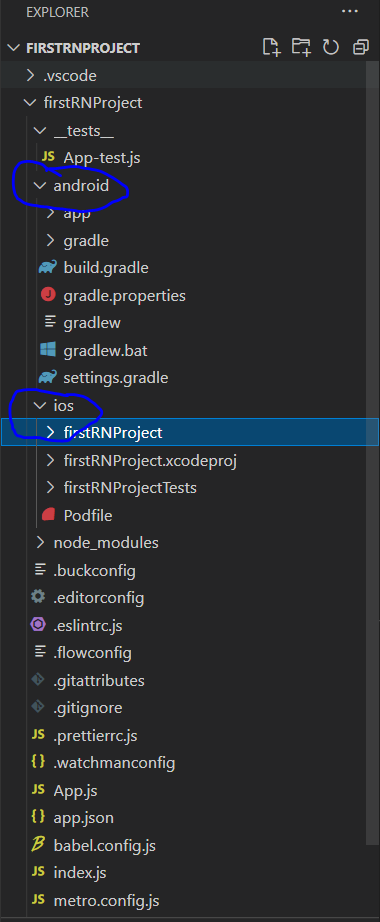
Setup React Native Project


npx react-native init <AppName>

Boilerplate generates for Android and Ios both.


Tuesday, May 25, 2021

NestJS - The Progressive NodeJS framework

 Refer the website : https://nestjs.com/

NestJS provides an out-of-the-box application architecture which allows developers and teams to create highly testable, scalable, loosely coupled, and easily maintainable applications. The architecture is heavily inspired by Angular.

Installation:

npm install -g @nestjs/cli
To create, build and run a new basic Nest project in development mode:

nest new casper-new-project

It creates a boilerplate

Running the application#

Once the installation process is complete, you can run the following command at your OS command prompt to start the application listening for inbound HTTP requests:


$ npm run start

This command starts the app with the HTTP server listening on the port defined in the src/main.ts file. Once the application is running, open your browser and navigate to http://localhost:3000/. You should see the Hello World! message.


Wednesday, May 8, 2019

RabbitMQ and MassTransit

Messaging systems:
In the real world, applications needs to talk to each other by sending messages.
Messaging has been around for decades.

Advanced Message Queuing Protocol (AMQP) is a protocol used by software companies to interact with the other applications. It is a neutral framework which makes the communication inter-operable. This was developed by different vendors like TIBCO, Microsoft MSMQ, IBM MQ Series.


Here is a list of different AMQP products:
AMQP Key concepts:
Message Broker:
Exchanges
Queues
Bindings

RabbitMQ:

RabbitMQ is a free and complete AMQP broker implementation. It implements version 0-9-1 of the AMQP specification; this is the most widespread version today and it is the last version that focuses on the client API.

It is built upon Erlang programming technologies. Erlang comes from the telecom background and gained a good reputation in the real world for its supper efficiency and reliability.

Time to install RabbitMQ. Not going to covert this at the moment due to time constraint.
After installation, just access the administration using the URL - http://localhost:15672/ and provide the username and password as “guest”.
To connect your .NET application to RabbitMQ using AMQP is done through using .NET api library or WCF service.
RabbitMQ.Client.dll is the .NET API DLL which you need to use to connect to RabbitMQ.
Next step towards using RabbitMQ is to create an exchange and queue. This can be done either manually using RabbitMQ web interface or through dynamically by coding either using C# or Powershell.


What is MassTransit?

MassTransit is a free, open-source distributed application framework for .NET. MassTransit makes it easy to create applications and services that leverage message-based, loosely-coupled asynchronous communication for higher availability, reliability, and scalability.

Tuesday, April 2, 2019

Modern JS (ES6], ES7...) features - TIPS and TRICKS


The Spread operator (feature of ES6)
The Spread operator is three dot (...) operator that perform different types of operations and after learning it you can say “I could do it with my eyes shut”.

So here are the examples :

1. Combine the content of the array :
If we have two arrays and we want a third array that combine the two arrays into one:

var devTeams = ["Yukon", "Thor", "Bradford", "Bristol"]
var qaTeams = ["Ward", "Blackwood"]
var teams= [...devTeams, ...qaTeams]

console.log(teams)   //  [ "Yukon", "Thor", "Bradford", "Bristol", "Ward", "Blackwood" ]

Here all the items of devTeams and qaTeams are pushed to one array called teams. You can also achieve this using concate().

var devTeams = ["Yukon", "Thor", "Bradford", "Bristol"]
var qaTeams = ["Ward", "Blackwood"]
var teams= devTeams.concat(qaTeams);

console.log(teams)   //  [ "Yukon", "Thor", "Bradford", "Bristol", "Ward", "Blackwood" ]

Note: Concatenation using the spread operator is three times slower than using concat. So, it better to use concat() for large data set.


2. Copy array :
As we know, slice() is javascript array method that allows us to copy the array.
For example :

// old
var devTeams = ["Yukon", "Thor", "Bradford", "Bristol"]
var cloneDevTeams = devTeams.slice();
console.log(cloneDevTeams );   //  [ "Yukon", "Thor", "Bradford", "Bristol"]

// new
var devTeams = ["Yukon", "Thor", "Bradford", "Bristol"]
var cloneDevTeams = [...devTeams];
console.log(cloneDevTeams );   //  [ "Yukon", "Thor", "Bradford", "Bristol"]

In both examples devTeams  and cloneDevTeams pointing to the different memory.


3.Grab the last item from the array

var devTeams = ["Yukon", "Thor", "Bradford", "Bristol"]
var [last] = devTeams .reverse()
console.log(last)   // Bristol
console.log(devTeams.join(', '))   // Bristol, Bradford, Thor, Yukon

So here what happened? Can you try to find the problem?
Actually the reverse function has been altered or mutated the array. In a world of the spread operator, we don’t have to mutate the original array. First, we can create a copy of the array and then reverse it:

var devTeams = ["Yukon", "Thor", "Bradford", "Bristol"]
var [last] = [...devTeams ].reverse()
console.log(last)   // Bristol
console.log(devTeams.join(', '))   // Yukon, Thor, Bradford,  Bristol

4. Get some, or the rest, of the items in the array

var devTeams = ["Yukon", "Thor", "Bradford", "Bristol"]
var [first, ...rest] = devTeams;
console.log(rest.join(", "))   // Thor, Bradford,  Bristol
console.log(first);    //Yukon

Note: Here first and rest are not keywords as mentioned below
var [first, ...rest] = devTeams;
Or
var [start, ...remaining] = devTeams;


5. Insert array into the middle of the array but not an array within array

var middleArr = [0, 0];
var arr = [8, 7, middleArr, 6, 5];

From the above mentioned code, Can you guess the answer of arr?

The answer is :  [8, 7, [0, 0], 6, 5]

It’s good if you want the same result but what if I want a single array, not like as mentioned above.

So, here we can use the Spread operator as its allow us to expand the array too.
var middleArr = [0, 0];
var arr = [8, 7,...middleArr, 6, 5];

console.log(arr);
// [8, 7, 0, 0, 6, 5]

It is like magic…….. And also you can say It’s easy as pie… :)


6. Math

We can also use math functions with the Spread operator and here I will be using Math.max() for explanation.

Math.max();
// -Infinity
Math.max(1, 2, 3);
// 3
Math.max(100, 3, 4);
// 100

Without the spread operator, easy way to use Math.max() with apply

var arr = [2, 4, 8, 6, 0];
function max(arr) {
 return Math.max.apply(null, arr);
}
console.log(max(arr));
// Output: 8

So, What you think, what is the syntax of finding the max value with the Spread operator?

Here is the code:
var arr = [2, 4, 8, 6, 0];
var max = Math.max(...arr);
console.log(max);


7. String to Array
Could you imagine, how many lines of code you will write to achieve the goal as mentioned?
Use the spread operator to simply convert a string to an array of characters:

var str = "helloworld";
var chars = [...str];
console.log(chars);
// [ "h", "e", "l", "l", "o", "w", "o", "r", "l", "d" ]


8. Replace apply:
In cases where you want to use the elements of an array as arguments to a function.

Example with apply
function myFunction(x, y, z) { console.log('Value y is ' + y); }
var args = [0, 1, 2];
myFunction.apply(null, args);
Example with Spread operator
function myFunction(x, y, z) { console.log('
// Value of y is 1

Value y is ' + y); }
var args = [0, 1, 2];
myFunction(...args);

// Value of y is 1

9. Shallow-cloning
Shallow-cloning (excluding prototype) or merging of objects is now possible using a shorter syntax than Object.assign().


var obj1 = { foo: 'bar', x: 42 };
var obj2 = { foo: 'baz', y: 13 };

var clonedObj = { ...obj1 };
// Object { foo: "bar", x: 42 }

var mergedObj = { ...obj1, ...obj2 };
// Object { foo: "baz", x: 42, y: 13 }